
xxxxxxxxxxxxxxxxxxxxxxxxxxxxxxx
xxxxxxxxxxxxxxxxxxxxxxxxxxxxxxx
| Home |

| NOTE: |
Temperatures shown below are crudely indicative only. See note 1. |
| NOTE: |
Only sometimes (repeat: sometimes), are faulty chips very signifcantly hotter than normal. It depends on the nature of the fault (the failure mode). |
|
In decending temperature xxxxxxxxxxxxxxxxxxxxxxxxxxxxxxx xxxxxxxxxxxxxxxxxxxxxxxxxxxxxxx |
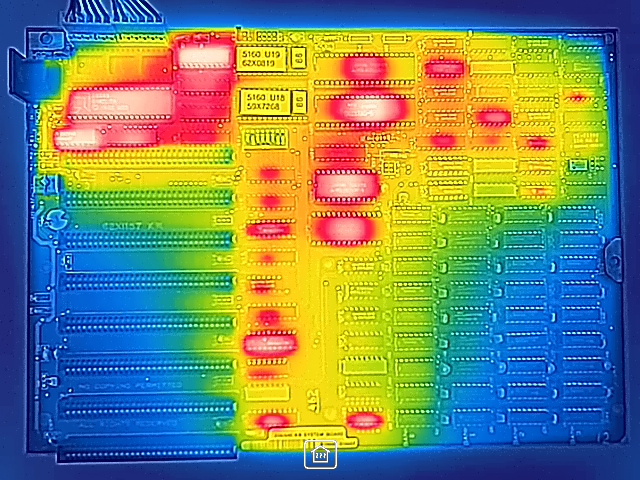 |
In decending temperature NEC D8237AC-5: About 59° Celcius Intel D8288: About 54° Celcius Mitsubishi M5L8253P-5: About 53° Celcius AMD D8284A: About 50° Celcius U11 (SN74S373N): About 47° Celcius Mitsubishi M5L8259AP: About 46° Celcius AMD D8088: About 45° Celcius Mitsubishi M5L8255AP-5: About 43° Celcius |
| Note 1 | • Do an Internet search for factors that affect temperature readings on a thermal camera. • The surrounding air temperature is expected to affect chip surface temperature. • Different makes of a chip could emit different levels of heat (because the circuitry inside the chip might be different). • Due to the motherboard design, the same make-model of a chip in socket {XXX} could emit a different level of heat to that in socket {YYY}. |