Home

RAYXTMFM Tool


This page is applicable to version 3.3 of RAYXTMFM


Description

RAYXTMFM.EXE is a DOS program that can be used in support of MFM/RLL type hard drive controllers and drives on PC or XT class computers.

Presently, RAYXTMFM does the following:
  • Looks for a BIOS expansion ROM starting at address C8000.  (C8000 is the normal address for the ROM on an XT-class MFM/RLL type hard drive controller.)
  • Identifies the motherboard class (PC/XT/AT).
  • Attempts to identify the motherboard BIOS.
  • Looks for and reports on certain problems.
  • Performs some INT 13h functions.

An example screen output is shown at here.


Requirements

For 'Part 5 of 5 - INT 13h':
  • An OS (operating sytem, e.g. DOS) does not need to be present on the MFM/RLL drive.
  • However, some of the tests will require that the drive contain a low-level format that is recognised by the controller.


Problems reported on

• Program is not being run on a PC or XT class computer.
   
• Warn-then-exit if the motherboard BIOS (if identified) is known not to support BIOS expansion ROM's.   (Usually, 1981 and 1982 dated motherboard BIOS'.)
   
• Warn-then-exit if unable to find a BIOS expansion ROM starting at address C8000.
   
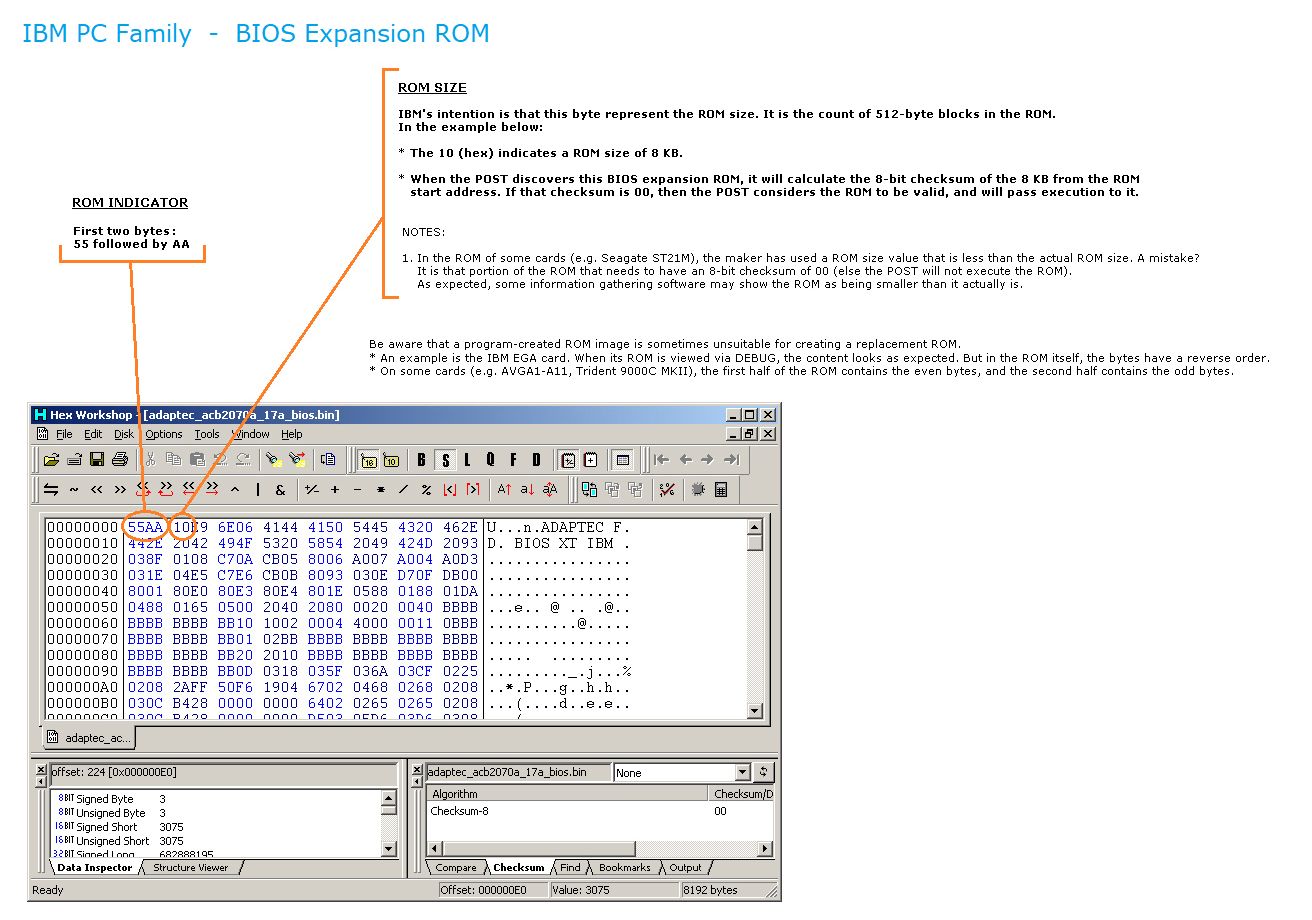
• Warn-then-exit if the declared size (third byte of BIOS expansion ROM) is zero.
• Warn-then-exit if the declared size (third byte of BIOS expansion ROM) is not a multiple of 2 KB.
• Warn-then-exit if the declared size (third byte of BIOS expansion ROM) is greater than 32 KB.
• Warn (but do not exit) if the declared size (third byte of BIOS expansion ROM) is less than 4 KB.   (Very suspicious.)
   
• Warn (but do not exit) if the 8-bit checksum of the declared size is not 00.
  (A warning at this stage because of what I have seen with some controllers.)
   
• Warn-then-exit if the BIOS expansion ROM found at C8000 has been identified as being for a SCSI card.
   
• Warn-then-exit if the BIOS expansion ROM found at C8000 has been identified as being the XTIDE Universal BIOS (XUB).
   
• Warn-then-exit if the BIOS expansion ROM found at C8000 cannot be identified.
(Only if the BIOS is identified as being one for an XT-class MFM/RLL type hard drive controller, are later test/checks valid.)
   
• If an IBM 5150/5160 BIOS, warn-then-exit if the vector for software interrupt 0Dh (i.e. triggered by hardware IRQ5) has not been changed from the one set by the power-on self test.
(That would indicate that the initialisation code in the controller's BIOS ROM has not been executed.)


Hard drive 0 versus hard drive 1

By default, part 5 of RAYXTMFM targets physical hard drive 0 (the DOS partition on it normally presented as logical drive C:).  For information about physical drives versus logical drives, see here.
If instead, hard drive 1 is the desired target, then use the HD1 switch as follows.

A:>rayxtmfm /hd1

An example situation in which you would use the HD1 switch is in the annex at the bottom of this web page.


Other command line switches/parameters

In addition to HD1, there are other command line switches/parameters.  They are detailed in the annex below.


Download

Click here.


Yet to do

• Identify more motherboard BIOS'
• Identify more BIOS expansion ROM's of XT class HDD controllers


Annex - Command line switches/parameters

On-screen, these will be shown if you use:  A:>rayxtmfm /?

You can use muliple switches, e.g.  A:>rayxtmfm /nopause /hd1

HD1

By default, part 5 of RAYXTMFM targets physical hard drive 0 (the DOS partition on it normally presented as logical drive C:).  For information about physical drives versus logical drives, see here.
If instead, hard drive 1 is the desired target, then use the HD1 switch as follows.

A:>rayxtmfm /hd1

EXAMPLE OF WHEN USED:

I have both an XT-IDE card (ROM at D0000) and an XT-class MFM hard disk controller (BIOS ROM at C8000) fitted.
At boot time, when I see the XUB's banner display, I choose to boot from the XT-IDE card.
The result of that action is:
    Hard drive 0 = IDE device on XT-IDE card
    Hard drive 1 = MFM drive
When I then run RAYXTMFM, I need to use the HD1 switch so that the MFM drive (now hard drive 1) is the target of RAYXTMFM's part 5.


FILE

Here, RAYXTMFM's output will be copied to a text file.  That can be useful for providing information to others.  The file created is named RAYXTMFM.TXT

To activate this, use the FILE switch as follows:  A:>rayxtmfm /file


NOPAUSE

RAYXTMFM will not pause for user acknowledgment.  To activate this, use the PAUSE switch as follows:  A:>rayxtmfm /nopause


NOMBCHECK

Part 2 of RAYXTMFM will be skipped, that is, RAYXTMFM will not try to ID the motherboard's BIOS ROM.  To activate this, use the NOMBCHECK switch as follows:  A:>rayxtmfm /nombcheck

Use with caution, because part 2 can reveal a problem.  Example: The particular motherboard BIOS is known NOT to support BIOS expansion ROM's.


NOC8000CHECK

Part 3 of RAYXTMFM will be skipped, that is, RAYXTMFM will not try to ID any BIOS ROM at C8000.  To activate this, use the NOC8000CHECK switch as follows:  A:>rayxtmfm /noc8000check

Use with caution, because part 3 can reveal a problem.  One example, of a few, is that the BIOS ROM at C8000 is for a known SCSI card, not an XT-class MFM/RLL controller.

This switch should only be used when all of the following are true:
• Part 3 finds a BIOS expansion ROM at C8000; and
• Part 3 indicates that it cannot identify that BIOS expansion ROM; and              ( <----- Indicates that RAYXTMFM needs enhancement )
• You know for fact that an XT-class MFM/RLL controller card, with its BIOS ROM sitting at C8000, is fitted.


NOINTCHECK

Part 4 of RAYXTMFM will be skipped, that is, RAYXTMFM will not examine the 0Dh interrupt vector.  To activate this, use the NOINTCHECK switch as follows:  A:>rayxtmfm /nointcheck

Use with caution, because part 4 can reveal a problem.